 Lumen
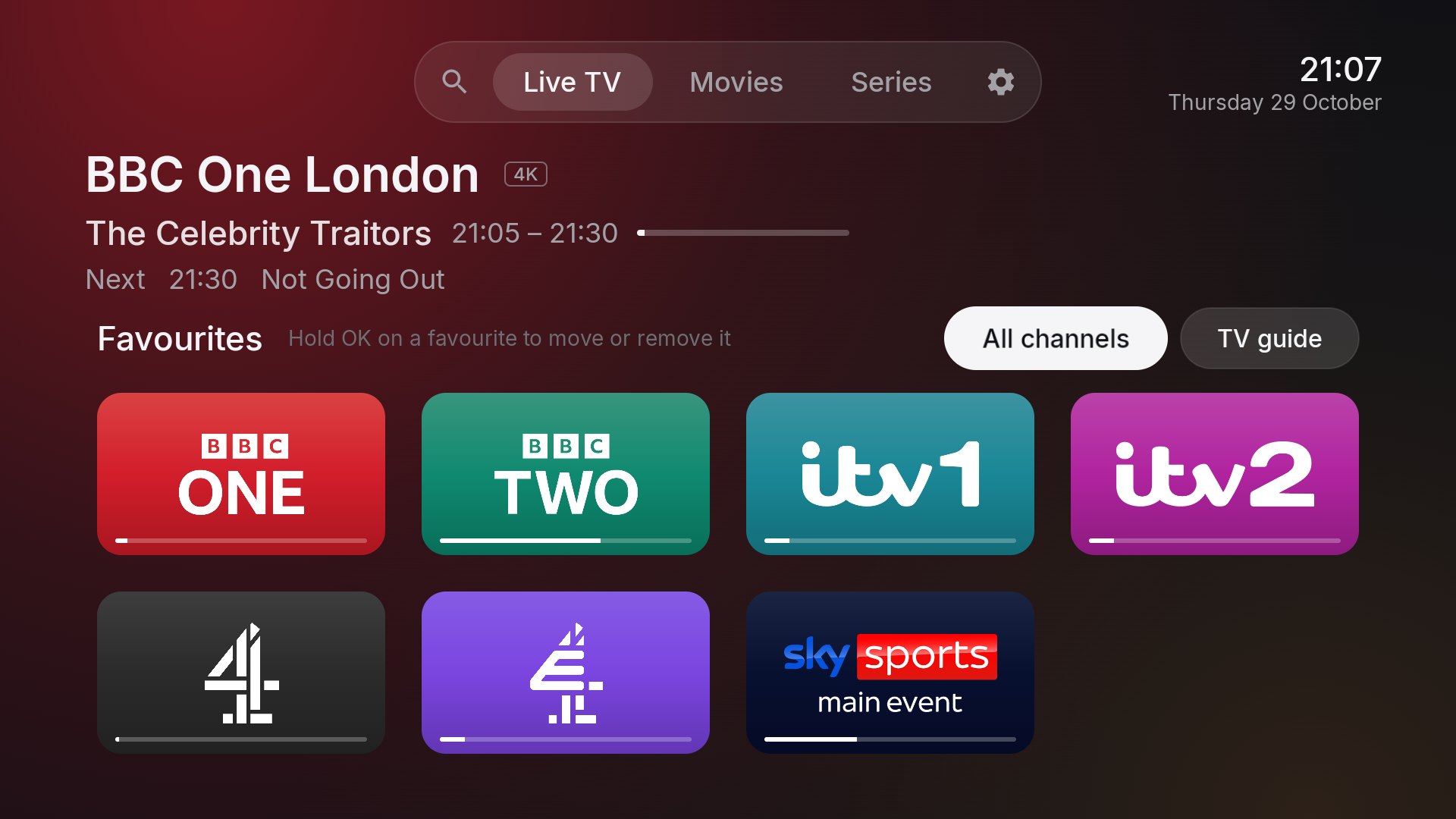
An IPTV player for your TV.
Live TV, a full guide, films and series, all in one place. Bring your own playlist and Lumen does the rest.
How Lumen works
Lumen is a player, not a provider. You bring your own TV service, and Lumen shows it in a clean, easy-to-use app.
Choose a service
Use any TV service you already have that gives you an M3U playlist or an Xtream login.
Add it to Lumen
Paste your playlist link or sign in once. Channels, guide, films and series all load on their own.
Sit back and watch
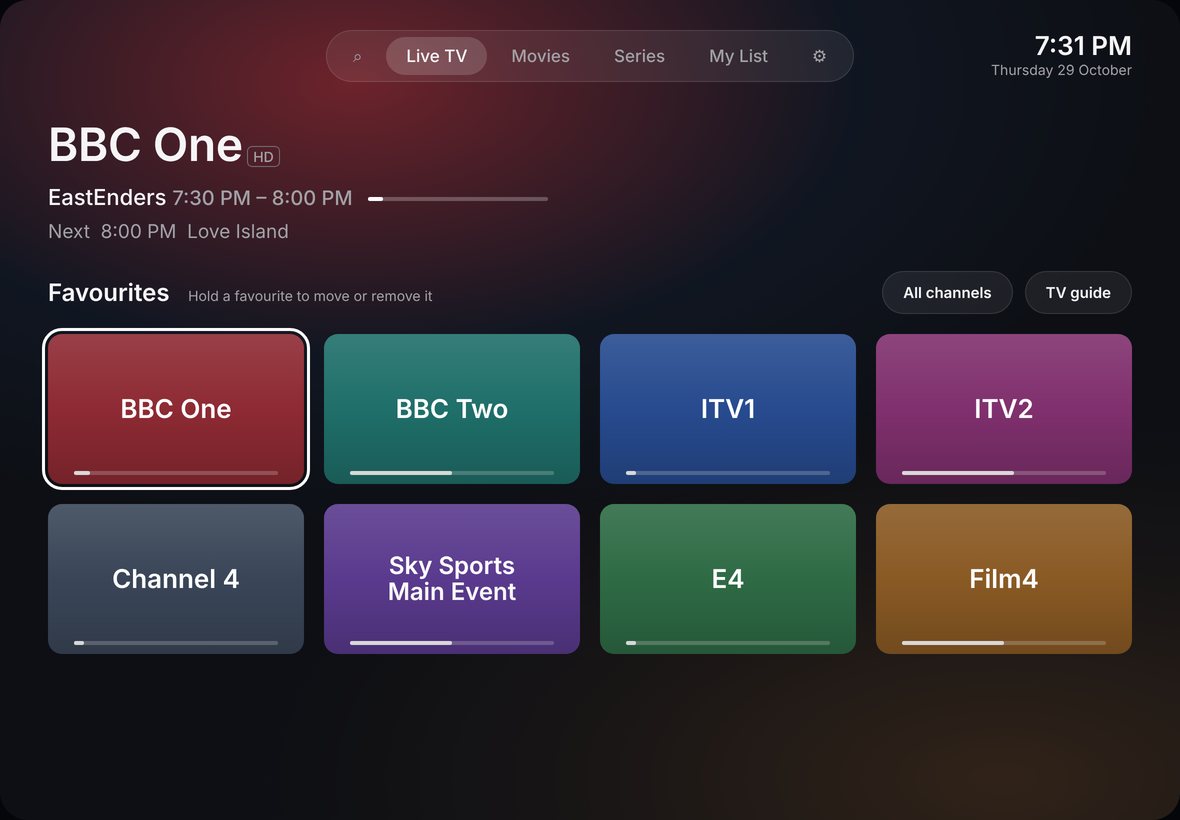
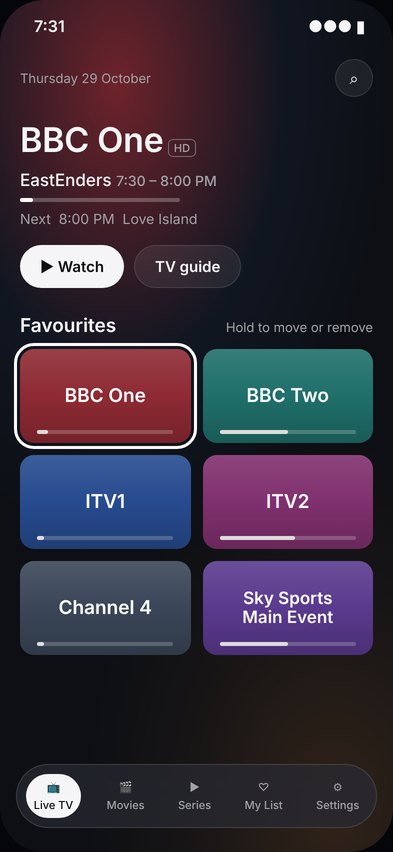
Your favourites open first, the guide is a click away, and films pick up right where you left off.
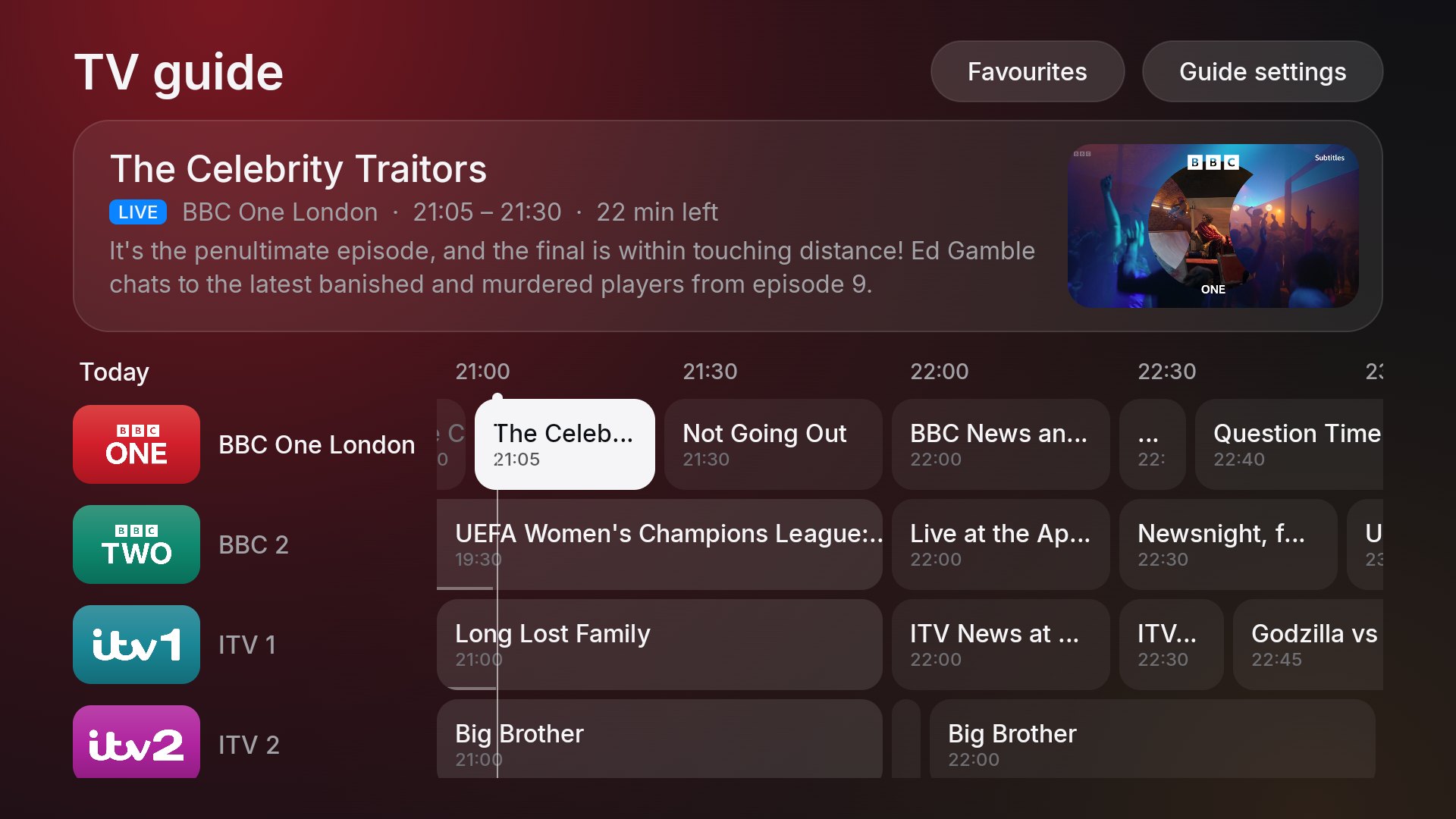
The whole day at a glance
A full TV guide with every channel and every programme, from half an hour ago to tomorrow. Glide through it with your remote and press OK to watch.

Films and series, the way they deserve
Large backdrops, ratings, seasons and episodes laid out clearly, and Continue watching for everything you started.
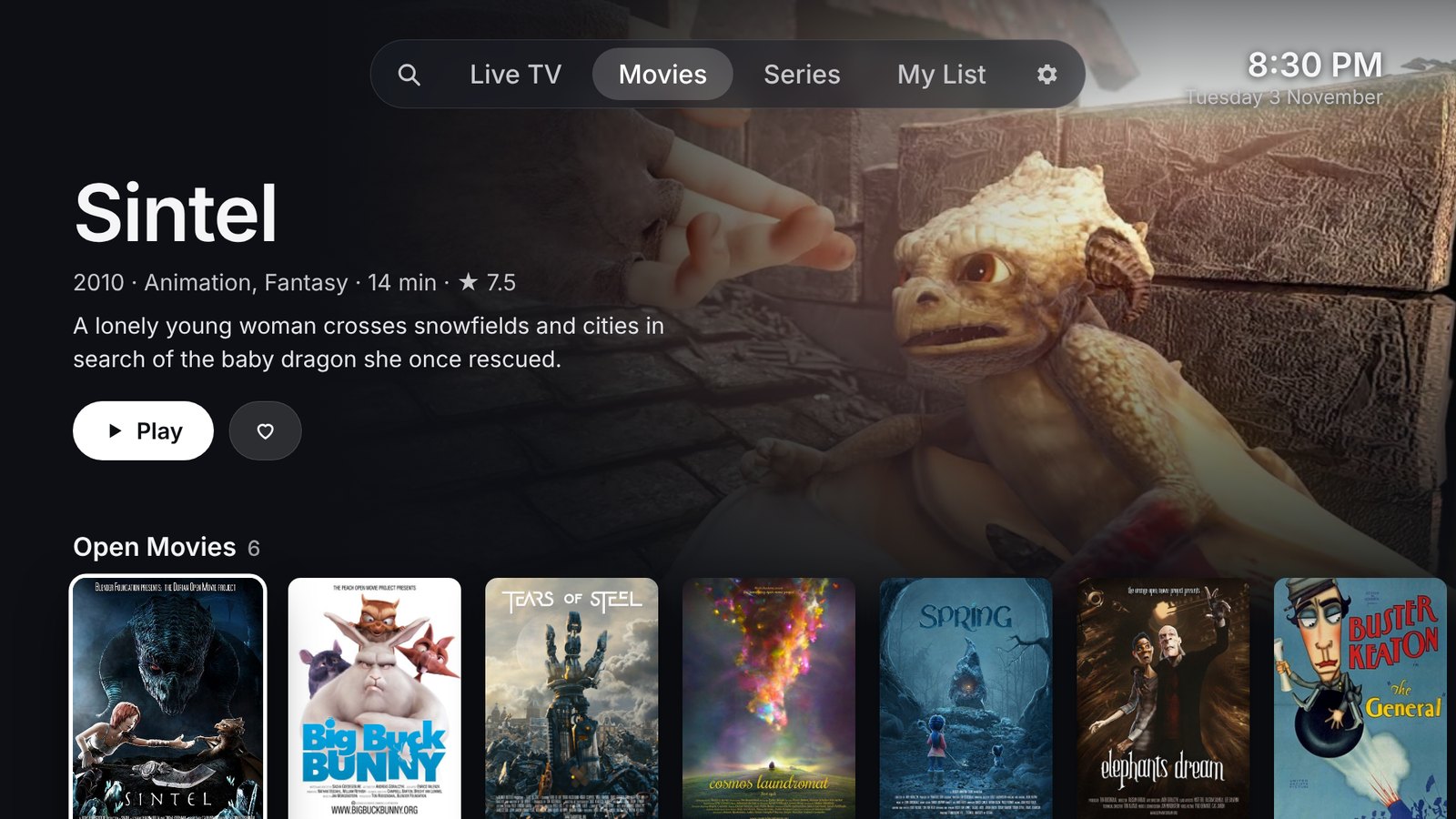
Films and series
The Movies tab opens on a featured film over its full backdrop, with every category below as a row of posters. Continue watching sits at the top, and anything can go on My List with a single press.
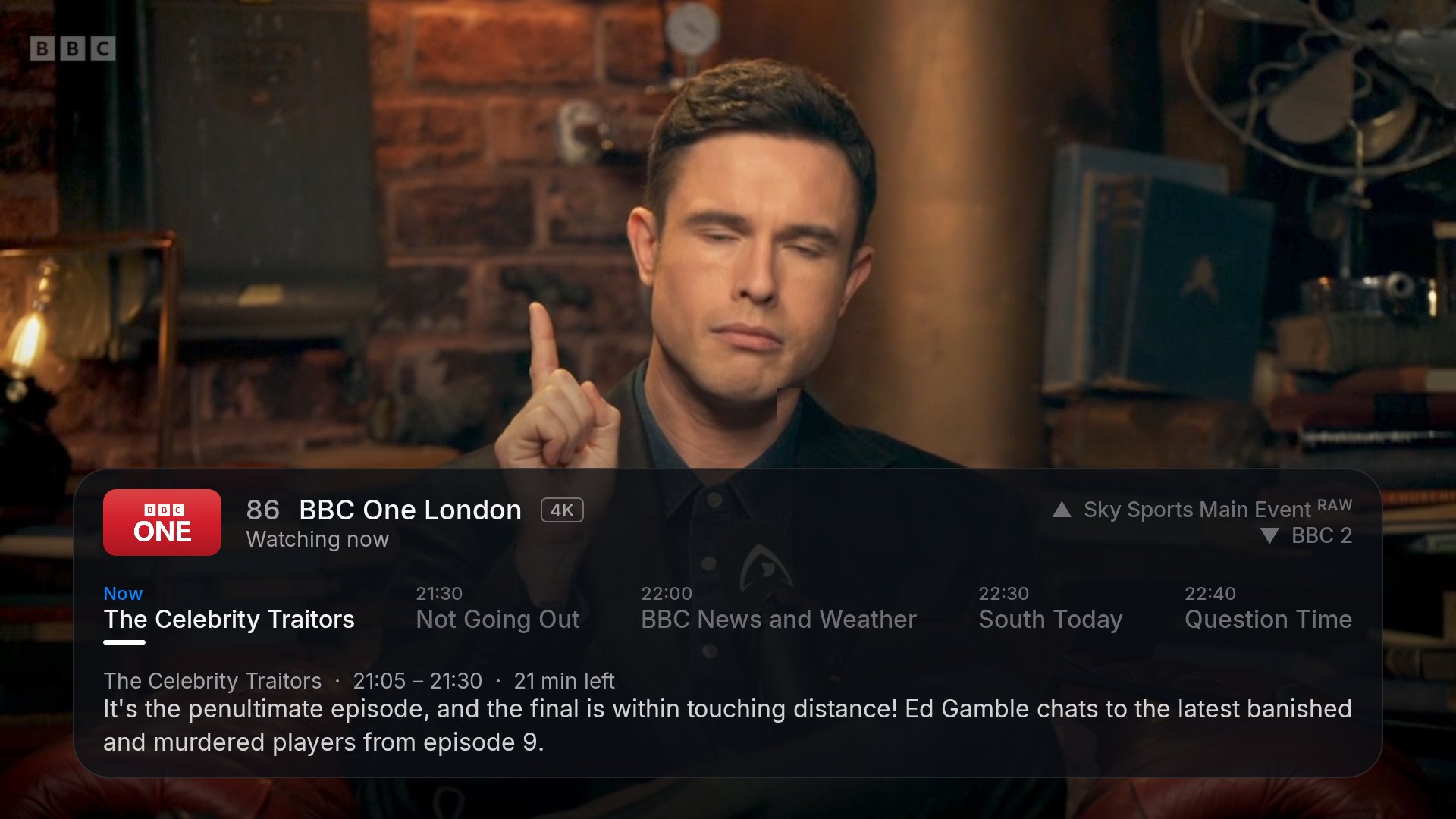
What's on next, without leaving the show
Press right while you watch to see what's coming up on that channel. Flick up and down to zap, with nothing getting in the way of the picture.
Everything you need. Nothing you don't.
Thoughtful touches that make every evening in front of the TV a little nicer.
Your favourite channels open first, as big cards.
Rest on a channel and a live preview starts playing inside it.
Continue watching picks up exactly where you stopped.
Hold to skip fast through films, minutes at a time.
Hide the categories you never watch, and rename the rest.
Choose audio and subtitles in a single press.
Completely free, with no ads, ever.
Updates itself: new versions arrive with one click.
Private by design. Lumen collects nothing about you.

Get Lumen on your TV
It takes about a minute. Works on Android TV, Google TV and Fire TV running Android 10 or newer.
- Install the free Downloader app from your TV's app store.
- Let Downloader install apps. Most TVs ask the first time; if not, see the tip below.
- Open Downloader and enter the code:
5956610
or the address lumen-tv.github.io/get - Choose Install, then open Lumen from your apps. That's it.
Tip: if Downloader doesn't ask, it's Settings → Apps → Security & restrictions → Unknown sources.
- Search for Downloader on your Fire TV's home screen, or say "Alexa, Downloader". Choose Get. It's free.
- Turn on Settings → My Fire TV → Developer options → Install unknown apps → Downloader.
- Open Downloader and enter the code:
5956610
then choose Go - Choose Install, then Open. Later you'll find Lumen under Apps on your home screen.
No Developer options? Open Settings → My Fire TV → About and press OK on your device's name 7 times.
Lumen needs Fire OS 8 or newer: you'll see yours under About → Software version.
Fire TVs that run Vega OS can't install apps from outside the Appstore, so Lumen won't work on them.
On the App Store
Lumen on iPhone and iPad
Lumen for touch. Watch live TV and the guide, carry on with films and series, and keep watching in picture in picture. Works on iPhone and iPad with iOS 18 or newer.
Synced with iCloud. Add a playlist on your iPhone and it's on your iPad too, along with your favourites, My List, where you stopped watching and the categories you've hidden or renamed. Your logins travel safely in your iCloud Keychain.
- Open the App Store on your iPhone or iPad and search for Lumen TV Player, or tap the button below.
- Tap Get. Lumen is free, with no ads and no account.
- Open Lumen and add your playlist link or Xtream login, just like on your TV.
 Free download
Lumen for Mac
Lumen in a window on your Mac. Live TV with the full guide, films and series, picture in picture and AirPlay, with handy keyboard shortcuts: Space to pause, arrows to change channel or skip, F for full screen.
Synced with your iPhone and iPad. Sign in with the same Apple Account and your playlists, favourites, My List and where you stopped watching are already there.
- Download Lumen.dmg with the button below.
- Open it and drag Lumen into your Applications folder.
- Open Lumen and add your playlist link or Xtream login. Lumen tells you when a new version is out.
For Macs with Apple silicon (M1 or newer) on macOS 15 or newer.
Questions
Everything you might want to know.
Does Lumen come with channels?
No. Lumen is only a player: it comes with no channels, playlists or films. You add your own M3U playlist link or Xtream login from a TV service you already use.
Which devices does it work on?
Android TV and Google TV televisions, streaming sticks and boxes, and Fire TV devices on Fire OS 8 or newer (Android 10 or newer). iPhone and iPad with iOS 18 or newer can get it from the App Store. Macs with Apple silicon on macOS 15 or newer can download Lumen for Mac.
Do my iPhone, iPad and Mac stay in sync?
Yes. With iCloud turned on, your playlists, favourites, My List, where you stopped watching and your hidden or renamed categories are the same on every iPhone, iPad and Mac signed in to your account. Logins are kept in your iCloud Keychain. Without iCloud, Lumen simply keeps everything on the device.
Can I install it with my TV's web browser?
Not on a Fire TV: its built-in browser can't install apps. Use the free Downloader app and the code 5956610 as shown above. Downloader has its own browser, and the code takes it straight to the newest version of Lumen.
Is it really free?
Yes. No subscription, no ads, no account to make.
How do updates work?
On your TV, Lumen tells you on its Home screen when a new version is out. Choose Update, confirm, and the new version is ready in moments. On iPhone and iPad, updates come through the App Store. Lumen for Mac checks for a new version when it opens and offers to download it.
Is there a TV guide?
Yes. Lumen loads your service's guide automatically, or you can add a separate guide link in Settings. It refreshes itself in the background.
What does Lumen know about me?
Nothing. Your playlists, logins and favourites stay on your devices. Lumen has no accounts, no analytics and no tracking. Read the privacy policy.